|

Whenever you open a window,
a button corresponding to
it will appear in the
taskbar. It disappears when closing the window.
Within the taskbar contains the Start
menu and system tray,
where you'll see a clock. Other icons can appear and disappear at any
given moment, showing the status of background activities. For example,
the printer icon will indicate when the printer is active or when you
send a file to the printer, and disappears when printing has finished.
You'll also be reminded in the notification
area when Windows updates
are available for download.
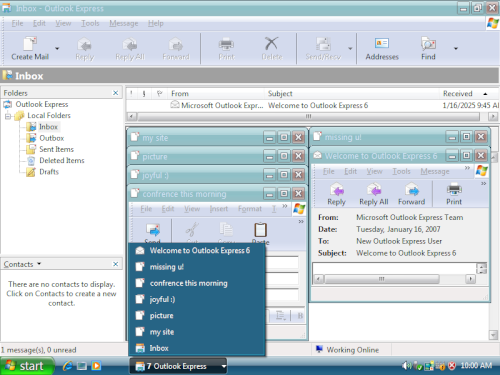
Windows XP keeps your taskbar organized by combining buttons into one
when a lot accumulate. For instance, buttons representing e-mails are
automatically grouped together under a single button. Clicking the
button allows for easy selection for the message you're looking for.
 |
|